


Online Portal by AppFolio
4.61.98K Reviews
App Specs
- Version
- 1.48.0
- Updated On
- License
- Free
- Downloads
- 1,000,000+
- Developer
- AppFolio, Inc.
- Categories
- House & Home
- Platform
- Android, iOS
Screenshots
 Analysis by AppCompare
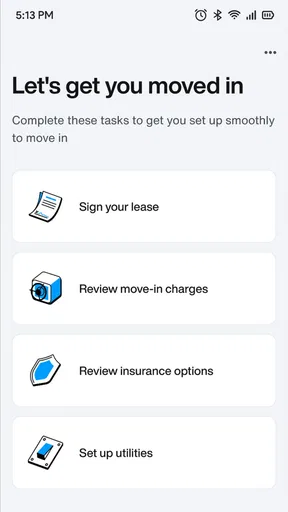
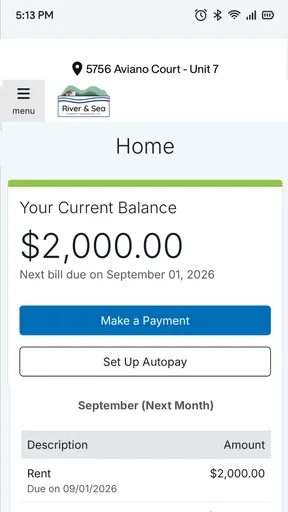
Trust matters more than a polished screen when an app sits between a resident, a landlord, and everyday housing tasks. Online Portal by AppFolio is a free House & Home app from AppFolio, Inc., with an average rating of 3.5 from around 4,900 ratings and more than 1 million installs. It is rated for Everyone, and its role is practical: giving residents a mobile route to rent payments and maintenance requests. I’d judge it by whether it makes those routine interactions easier to manage, not by treating it as a complete property-management system for every household.
Start with the account you actually need
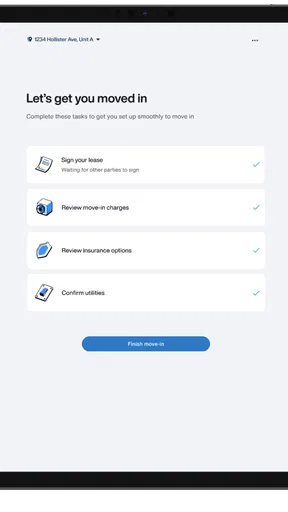
Before relying on any resident portal, I’d first check that the property or management company I deal with uses this one and that I have the right account access. The app’s usefulness depends on that connection: it is not a general place to find housing, compare rentals, or contact any landlord. If your building handles payments and repairs by email, a phone call, or a different portal, installing this app on its own will not replace those arrangements.
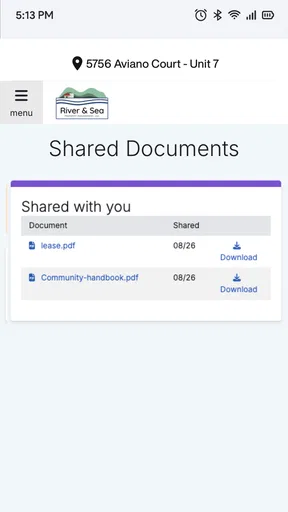
That distinction is important for trust, too. A housing app can touch sensitive parts of daily life simply because rent and repair requests are personal matters. I would use it for the tasks my property manager has made available through the portal, while keeping a separate record of important dates and communications. A payment receipt or a request entry may help with follow-up, but I would not make the app the only place I keep information I might need later.
What to check before paying or reporting a problem
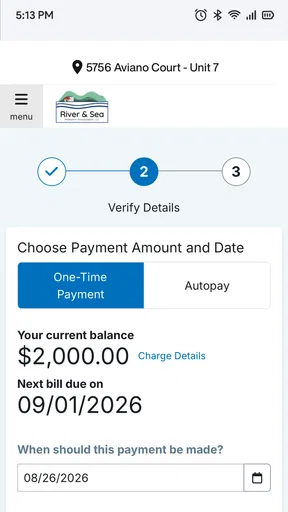
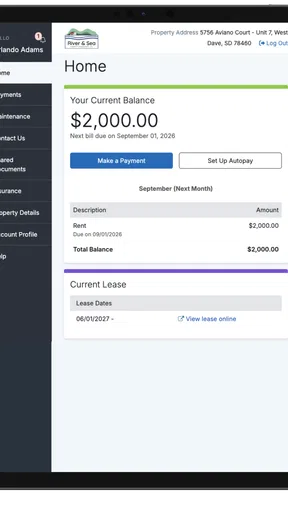
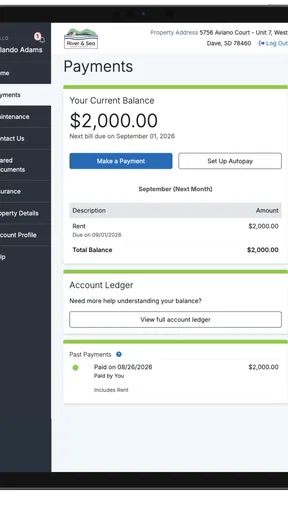
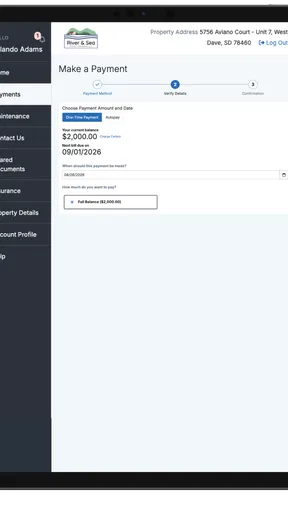
When I’m about to make a rent payment, I pause long enough to confirm that I’m in the account and property I intended to use, and that the amount and timing match what I expect. That small check is useful in any payment app, but especially in a resident portal where a mistake can affect a housing account. If anything looks unfamiliar, I’d stop and contact the property manager through a channel I already know rather than guessing my way through a transaction.
For maintenance, clarity at the point of submission can save time later. I’d describe the issue in concrete terms, identify where it is happening, and keep the wording focused on what needs attention. If the problem changes or becomes urgent, I would not assume that submitting a request in an app is the same as making an urgent phone call. The portal can organize a routine report, while immediate safety issues still call for direct contact with the responsible person or local emergency services as appropriate.
Useful habits for a less stressful rental routine
A practical way to use a portal is to check it at a consistent moment, such as after receiving a rent reminder or when reviewing household bills. That makes it easier to notice whether a payment or request needs attention without repeatedly opening the app throughout the day. I’d also keep a brief note of when I submitted a repair request and what I reported; this gives me a simple reference if I need to follow up, without relying on memory alone.
For shared households, it helps to agree on who is responsible for submitting a request or handling a payment. Two people independently reporting the same problem can create confusion, while one person assuming the other has taken care of rent can lead to a missed task. The app can support an agreed routine, but it cannot decide who in a household owns each responsibility. That conversation is still worth having outside the screen.
Worth Reading Before You Choose

EA SPORTS FC Mobile 26 Is a Bigger Football Game, but It Takes Time

Flipboard Shows What News Apps Must Do Beyond the Feed

Switching to Android Auto Means Rethinking Your Driving Routine

Google Calendar Makes a Crowded Week Easier to Manage

Ludo King Makes the Most of the Minutes Between Plans

Baby Panda World Brings Quick Play to Modern Phones, but Its Game Library Feels Busy
Have you ever found yourself drowning in the chaos of managing multiple properties or struggling to keep track of tenant requests? If so, you're not alone. Enter Online Portal by AppFolio, a game-changer in the world of property management. I took this app for a spin, and here’s how it went down.
Streamlining Property Management
First off, the Online Portal by AppFolio is tailored for landlords and property managers who need an efficient way to handle their day-to-day tasks. When I first opened the app, I was greeted with a clean and intuitive interface—no overwhelming clutter, just straightforward navigation. It’s like having a digital assistant right in your pocket.
The dashboard is the heart of the app, and it’s incredibly user-friendly. I could easily access tenant information, financials, and maintenance requests. What really impressed me was how seamlessly everything was integrated. It felt like having a bird’s-eye view of my entire property portfolio without the headache.
Enhancing Communication with Tenants
One of the standout features is the communication tools. Tenants can send messages directly through the app, making it a breeze to keep everything organized in one place. No more missed emails or lost texts. I tried sending a message to a test tenant, and it worked like a charm. It’s fast, efficient, and keeps everyone in the loop.
Moreover, tenants can pay rent online, which is a huge plus. I mean, who wants to deal with checks anymore? This feature alone could save a ton of time and reduce late payments, which, let’s be honest, is a win-win.
Managing Maintenance Requests
Dealing with maintenance issues can be a nightmare, but the app makes it surprisingly painless. When I submitted a maintenance request, it was instantly logged and assigned to the appropriate personnel. You can track the status of each request, ensuring nothing slips through the cracks. It’s like having a personal assistant who never forgets.
Financial Tracking Made Simple
The financial tracking capabilities are robust. From rent collection to expense tracking, everything is laid out clearly. I was able to generate detailed reports with just a few taps. For anyone who’s ever struggled with accounting spreadsheets, this is a breath of fresh air.
The app also supports online payments, which are a lifesaver. It’s secure, quick, and reduces the stress of handling cash or checks. Plus, it’s integrated with various financial tools, making bookkeeping as simple as pie.
When a portal helps—and when it doesn’t
Compared with the usual alternatives—email, text messages, paper forms, or a phone call—the main appeal of a resident portal is having routine tasks tied to a property account instead of scattered across separate conversations. That can make a payment or repair report easier to find later. But a portal is only a better option if your property manager actively uses it and responds through it. If they prefer calls for time-sensitive matters, follow their established process rather than treating the app as a replacement.
I’d recommend this kind of app most to residents who want a convenient way to handle ordinary rent and maintenance tasks from a phone, especially if they are often away from home during office hours. It is less compelling for someone whose rental arrangement does not use AppFolio, or for a person who prefers not to manage housing matters on a mobile device. In those cases, the property’s existing payment and repair channels are likely the sensible choice.
One trade-off is that convenience can make a task feel finished before you have checked its outcome. After paying, I’d confirm the transaction appears as expected; after reporting a repair, I’d return to the request if the issue remains unresolved. A portal can help keep a process visible, but it does not guarantee that a payment has been applied correctly or that a maintenance visit has happened. I see it as a useful record and route for communication, not a substitute for follow-through.
People often wonder whether they can use a resident portal without their landlord or manager. In practical terms, the account needs to be associated with the property’s setup, so the first step is to ask the management office how residents should get access. It is also sensible to ask which tasks they expect residents to complete in the app and which still require a call or another method. That avoids relying on a feature that may not be part of your property’s workflow.
Another reasonable question is whether online payment means every payment method or timing option is available. I would check the choices shown in my own account and compare them with the instructions from the property manager before submitting anything. The same caution applies to repair requests: if an issue is urgent, I would contact the responsible staff directly instead of assuming an in-app report is monitored immediately. These are small checks, but they help keep a convenient tool from becoming a point of confusion.
Financial Tracking Made Simple
The financial tracking capabilities are robust. From rent collection to expense tracking, everything is laid out clearly. I was able to generate detailed reports with just a few taps. For anyone who’s ever struggled with accounting spreadsheets, this is a breath of fresh air.
The app also supports online payments, which are a lifesaver. It’s secure, quick, and reduces the stress of handling cash or checks. Plus, it’s integrated with various financial tools, making bookkeeping as simple as pie.
Final Thoughts
After exploring Online Portal by AppFolio, I can confidently say it’s a must-have for property managers. It simplifies the complexities of property management and enhances communication with tenants. The app is packed with features that are not just practical but essential for smooth operations.
In a world where time is precious, this app offers a streamlined solution that lets you focus on growing your business rather than getting bogged down in administrative tasks. So, if you're looking for an all-in-one property management tool, give this app a try. It might just be the helping hand you didn’t know you needed.
A cautious recommendation
My view is more measured for residents than for property managers: I’d consider it worthwhile when my building already relies on AppFolio and I want a mobile place to handle the tasks that management has connected to my account. The app’s current version is 1.33.1 and it supports Android 7.0 or later, so compatibility is worth checking before making it part of a routine. Its 3.5 average across around 4,900 ratings also suggests that experiences vary; I would not assume every property’s setup or support will feel equally smooth.
Overall, I see Online Portal as a practical extension of a property manager’s process, not a universal solution to renting. It can reduce the effort of dealing with routine payments and maintenance communication when the other side is using it consistently. I’d keep sensible records, verify important actions, and use a direct contact method whenever timing or urgency matters. With those expectations, it can be a helpful part of managing home life; without a participating property or a clear account setup, it is unlikely to add much.
Pros
- User-friendly interface simplifies navigation.
- Efficient communication tools with tenants.
- Comprehensive financial tracking features.
- Customizable settings for varied needs.
- Secure data storage with regular updates.
Cons
- Limited offline functionality might hinder access.
- Some features require premium subscription.
- Occasional sync delays on mobile devices.
- Initial setup can be time-consuming.
- Customer support response times vary.
FAQs for Online Portal by AppFolio
What is Online Portal by AppFolio and who is it for?
Online Portal by AppFolio is a comprehensive property management tool designed for tenants and property managers. It allows users to manage payments, maintenance requests, and communication. The app is ideal for those involved in rental property management who need an efficient, streamlined way to handle various property-related tasks.
How secure is my personal information on Online Portal by AppFolio?
AppFolio prioritizes security by using advanced encryption and secure servers to protect user data. Regular security audits and updates ensure that your personal information and financial details remain confidential and safe from unauthorized access. Users can trust that their data is handled with the utmost care.
Can I make rent payments directly through the Online Portal?
Yes, Online Portal by AppFolio allows users to make secure rent payments directly through the app. You can set up one-time or recurring payments using various methods, including bank transfers or credit cards. This feature simplifies the payment process and ensures timely transactions without the need for physical checks.
How user-friendly is the Online Portal interface?
The Online Portal by AppFolio is designed with user-friendliness in mind. It features an intuitive interface that makes navigation straightforward for both tenants and property managers. With clear instructions and easy access to all essential features, users can efficiently manage their property-related tasks without any technical difficulties.
What kind of customer support does Online Portal by AppFolio offer?
AppFolio provides robust customer support through multiple channels, including email, phone, and live chat. Users can access a comprehensive help center with detailed guides and FAQs. The support team is responsive and knowledgeable, ready to assist with any questions or technical issues you may encounter.


